Print and Cut: Difference between revisions
No edit summary |
|||
| (12 intermediate revisions by the same user not shown) | |||
| Line 7: | Line 7: | ||
Cutters<br> | Cutters<br> | ||
*[https://www.siserna.com/beginners-guide-to-the-siser-romeo/ Siser Romeo] | *[https://www.siserna.com/beginners-guide-to-the-siser-romeo/ Siser Romeo] | ||
*[https://wiki.hackrva.org/index.php/Vinyl_Cutter_-_Brother_Scan-N-Cut_2 Brother | *[https://wiki.hackrva.org/index.php/Vinyl_Cutter_-_Brother_Scan-N-Cut_2 Brother ScanNCut2 CM350] | ||
*[[Vinyl Plotter & Cutter - Mimaki CG-130FX]] | *[[Vinyl Plotter & Cutter - Mimaki CG-130FX]] | ||
Paper | Paper Trimmers<br> | ||
*[https://images.salsify.com/image/upload/s--OeFQfls1--/nkon6ehlsenostrmavgz.pdf Dahle 554 Rotary] | *[https://images.salsify.com/image/upload/s--OeFQfls1--/nkon6ehlsenostrmavgz.pdf Dahle 554 Rotary] | ||
* [https://rotatrim.com/wp-content/uploads/2024/10/UserGuide_Professional_web1.pdf RotaTrim Prof M Series] | * [https://rotatrim.com/wp-content/uploads/2024/10/UserGuide_Professional_web1.pdf RotaTrim Prof M Series] | ||
| Line 25: | Line 25: | ||
|- | |- | ||
! Speed | ! Speed | ||
! | ! Force | ||
! Speed | ! Speed | ||
! | ! Force | ||
|- | |- | ||
| Koala Matte Vinyl Sticker Paper | | Koala Matte Vinyl Sticker Paper | ||
| Line 57: | Line 57: | ||
|- | |- | ||
! colspan="2" | Speed | ! colspan="2" | Speed | ||
! colspan="2" | | ! colspan="2" | Force | ||
|- | |- | ||
| Siser EasyColor DTV | | Siser EasyColor DTV | ||
| Line 75: | Line 75: | ||
Leonardo Design Studio - Force Test Cut Feature with Siser Juliet or Romeo: https://www.youtube.com/watch?v=rFiz-m8cDw8 | Leonardo Design Studio - Force Test Cut Feature with Siser Juliet or Romeo: https://www.youtube.com/watch?v=rFiz-m8cDw8 | ||
Mastering the Cold Roll Laminator: https://www.youtube.com/watch?v=NRrQTGRgKHU | Mastering the Cold Roll Laminator: https://www.youtube.com/watch?v=NRrQTGRgKHU<br> | ||
* If you are having issues with wrinkling and creasing it's best to roll it through once before folding down the end as shown here: https://youtube.com/shorts/TJ4vRYSMjrU?si=Jk24apAwupaFzL8y | |||
=Sticker Tips | =Sticker Tips= | ||
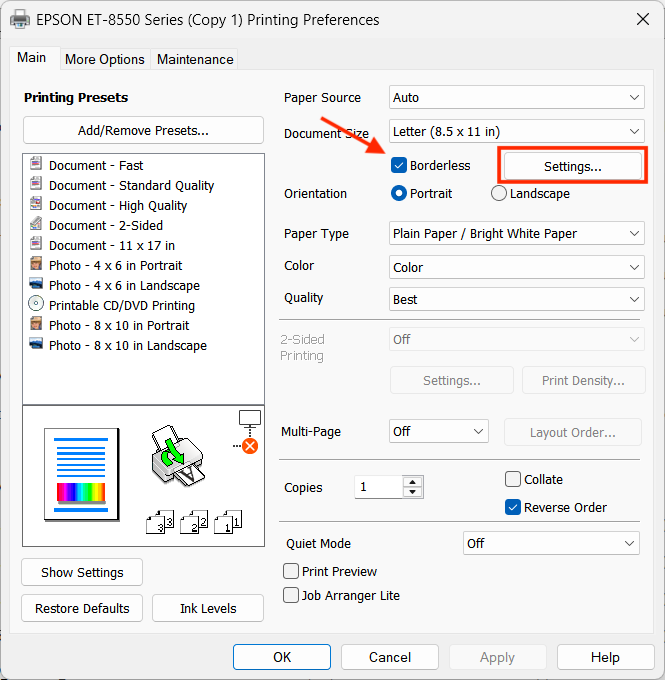
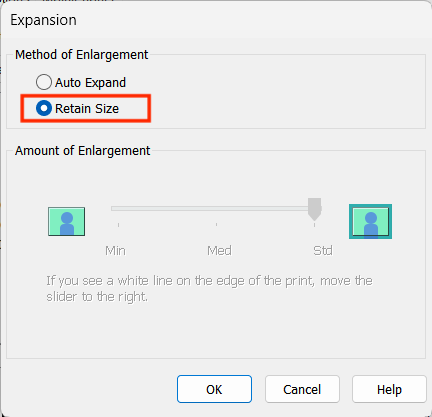
* When printing, ensure 'borderless' is enabled in print settings, and ensure that it will not resize the image on print. '''''Dimensional accuracy matters or the Siser won't read the registration marks correctly.''''' If you discover that the Siser is overshooting/undershooting the registration marks, this is likely the issue. | * When printing, ensure 'borderless', 'retain size' is enabled in print settings, and ensure that it will not resize the image on print. '''''Dimensional accuracy matters or the Siser won't read the registration marks correctly.''''' If you discover that the Siser is overshooting/undershooting the registration marks, this is likely the issue.<br> | ||
[[file:EpsonET-8550Settings.png|400px|link=]][[file:EpsonET-8550Settings2.png|400px|link=]] | |||
=Heat Transfer Vinyl Tips= | =Heat Transfer Vinyl Tips= | ||
| Line 86: | Line 89: | ||
=Button Makers= | =Button Makers= | ||
PDFs must be print to Epson ET-8550 borderless | PDFs must be print to Epson ET-8550 borderless & retain size to match the Siser cut file, cutting force: 20. | ||
*Small 1" Button Maker (generic)<br> | *Small 1" Button Maker (generic)<br> | ||
**Canva template: https://canva.link/mr4wv4qlcwhk44n<br> | **Canva template: https://canva.link/mr4wv4qlcwhk44n<br> | ||
**Print template: <br> | **Print template: [https://wiki.hackrva.org/images/e/e8/35mmButtonTemplate.pdf PDF]<br> | ||
**Siser cut file: [https://drive.google.com/open?id=1hG0AGWrr3-pGavNNSSM9V_bLNS06vl2_&usp=drive_fs LDS] <br> | **Siser cut file: [https://drive.google.com/open?id=1hG0AGWrr3-pGavNNSSM9V_bLNS06vl2_&usp=drive_fs LDS] <br> | ||
Latest revision as of 14:39, 17 August 2026
The print & cut station is setup with Affinity suite, Inkscape, Gimp, and Adobe Acrobat. There is an Epson 6 color inkjet wide format printer set up with 24” Siser vinyl cutter, cold roll laminator, and 28" Dahle 554 / 18" RotaTrim Mastercut II rotary paper cutters. There is also a Brother ScanNCut 2 and 54" Mimaki cutter available for use. HackRVA supplies the printer ink and small amounts of vinyl inkjet sticker paper (Koala Matte) and over-laminate (Substance Icon PL-3150). Members are expected to provide their own supplies for large projects.
Printer
Cutters
Paper Trimmers
Feeds & Speeds

Table is for reference only. Please perform a test with your materials to verify before running a job.
| Decals | Kiss Cut | Die Cut | ||
|---|---|---|---|---|
| Speed | Force | Speed | Force | |
| Koala Matte Vinyl Sticker Paper | 10 | 20 | 10 | 58 |
| Koala Matte Vinyl Sticker Paper w/ Over-laminate | 10 | 50 | 10 | 80 |
| Qixin Holographic Vinyl Sticker Paper | 10 | 40 | 10 | 80 |
| Qixin Holographic Vinyl Sticker Paper w/ Over-laminate | 10 | 70 | 10 | 110 |
| Heat Transfer Vinyl | Kiss Cut | |||
| Speed | Force | |||
| Siser EasyColor DTV | 10 | 15 | ||
| TransOurDream Dark 1.0 | 10 | 15 | ||
Learn
Videos:
A Step By Step Guide in Sticker Making with Siser Cutters: https://www.youtube.com/watch?v=_sI2lz1M8PE
Leonardo Design Studio - Force Test Cut Feature with Siser Juliet or Romeo: https://www.youtube.com/watch?v=rFiz-m8cDw8
Mastering the Cold Roll Laminator: https://www.youtube.com/watch?v=NRrQTGRgKHU
- If you are having issues with wrinkling and creasing it's best to roll it through once before folding down the end as shown here: https://youtube.com/shorts/TJ4vRYSMjrU?si=Jk24apAwupaFzL8y
Sticker Tips
- When printing, ensure 'borderless', 'retain size' is enabled in print settings, and ensure that it will not resize the image on print. Dimensional accuracy matters or the Siser won't read the registration marks correctly. If you discover that the Siser is overshooting/undershooting the registration marks, this is likely the issue.
Heat Transfer Vinyl Tips
- For the TransOurDream HTV paper, start with 345 as the temperature, and adjust the heat press pressure so it takes some force to close the press on your workpiece, but you don't have to hang on it.
- 12-15 seconds is a good starting point for time. Too long and it can make the colors less vibrant as the ink burns. It can take a second to unlatch the heat press, so take that into account in your timing.
Button Makers
PDFs must be print to Epson ET-8550 borderless & retain size to match the Siser cut file, cutting force: 20.
- Small 1" Button Maker (generic)
- Canva template: https://canva.link/mr4wv4qlcwhk44n
- Print template: PDF
- Siser cut file: LDS
- Canva template: https://canva.link/mr4wv4qlcwhk44n
- Large 2.25" Button Maker (Badge-a-minit)
- Canva template: https://canva.link/htvduuwk55l7cd7
- Print template: PDF
- Siser cut file: LDS
- Canva template: https://canva.link/htvduuwk55l7cd7